CryptSecure
CryptSecure
Seal it. Send it. Prove it.
Signed, post-quantum encryption for messages, files and whole folders, on Windows, Linux or right inside Outlook and Word. Your private keys stay locked to your own hardware. Seal one envelope for a whole team, deliver it through the CryptSecure Broker, and prove who received exactly what, and when.
Free on Windows & Linux · No account · Encrypts offline · Set up in a minute
Drag in files, folders and a message. Encrypt once for one person or a whole group, classical + post-quantum. Offline, on your device.
CryptSecure appDeposit the sealed envelope. The Broker refuses anything that is not genuinely encrypted, then notifies every recipient.
CryptSecure BrokerA verified pickup for each recipient, local decryption, and a hash-chained receipt both sides can export and check.
Both sides- Post-Quantum by Default (FIPS 203/204)
- Signed with ML-DSA-87
- Keys Locked to Your Hardware
- Windows, Linux, Outlook & Word
- Key-Blind Broker
- Encrypts 100% Offline
Free. Installed in a minute. Locked down from your first key.
Windows 10 & 11 and Debian/Ubuntu Linux, no account needed. Every copy is post-quantum by default, signs what you send and locks your keys to your own hardware. On Windows, add the Outlook & Word add-in and never leave Office.
Windows 10 & 11
One-click install from the Microsoft Store. The full CryptSecure app, with broker delivery built in.
Get it from the Microsoft Store- Post-quantum by default
- Signed with ML-DSA-87
- Keys locked to your PC’s TPM
- Free · no account · offline
Linux
Self-contained .deb packages for Debian & Ubuntu (22.04–26.04, Debian 11–13), Intel/AMD and ARM.
Choose your architecture & download
$ sudo apt install ./cryptsecure_3.0.5-1_amd64.deb
Setting up cryptsecure (3.0.5-1) ...
# CryptSecure is now in your app menu
On ARM, use the arm64 file name.
Getting started
Outlook & Word
Encrypt and sign email in Outlook, and text in Word, right from the ribbon. Your keys stay in the CryptSecure app.
Free · Windows 10/11 · no admin rights
Install in 3 steps
- Install the latest CryptSecure for Windows and create your key.
- Close Outlook and Word, unzip, and run Setup.
- In Outlook, open
aka.ms/olksideload› My add-ins › Add a custom add-in › Add from File. Classic Outlook can take up to 24 hours to show it; Outlook on the web shows it right away.
What it works with
Free · PDF · CryptSecure 3.0.5 User Guide
From first key to court-ready receipt, in one guide.
Every screen and command, with real screenshots: key protection and recovery, safety numbers, sending with proof, and scripting. Moving from 2.6? It shows you how to bring your keys.
Encryption hides it. It doesn’t prove it.
Most tools stop at “scrambled.” Real work needs three things: the content stays private for decades, it reaches only the right person, and you can prove it did.
“Did they get it? Was it changed?”
An email attachment leaves no record you control. You can’t show what was sent, that it arrived intact, or who opened it.
CryptSecure answer: every handoff is fingerprinted and written to a hash-chained ledger both parties can verify.
“It’s encrypted, so it’s safe forever.”
Adversaries already store encrypted traffic to crack later (“harvest now, decrypt later”). NIST’s final transition plan (Oct 2026) deprecates RSA after 2030 and disallows it after 2035, at every key size.
CryptSecure answer: by default it layers post-quantum ML-KEM-1024 with ECDH P-384, so an attacker must break both.
Source: NIST IR 8547
“The vendor says it’s secure.”
If a service holds your keys, a breach, insider or subpoena can expose your files. Many “secure portals” work exactly that way.
CryptSecure answer: keys stay on your PC. The Broker only ever sees ciphertext, so there is nothing readable to leak or hand over.
“Can’t I just encrypt a file and drop it in Dropbox?”
You can, and it stays private. But storage isn’t delivery.
The app seals. The Broker delivers and proves.
Use the desktop app on its own, fully offline, or pair it with the Broker when the handoff itself has to stand up to scrutiny.
CryptSecure 3
Post-quantum encryption you control, signed so recipients know it’s really you, with zero internet required.
- Post-quantum by default: hybrid ML-KEM-1024 + ECDH P-384 (CNSA 2.0)
- Every envelope signed with ML-DSA-87, so recipients can confirm the sender
- Encrypt for one recipient or many, in a single envelope
- Drag and drop files and whole folders; AES-256-GCM authenticated
- Encrypt email in Outlook and text in Word with the free add-in (Windows)
- Private keys locked to your PC’s TPM or a security key, with a recovery code only you hold
- Your keys, your device — no account, no servers, no telemetry
CryptSecure Broker
Key-blind delivery with a chain of custody both sides can check.
- Accepts only genuinely encrypted envelopes
- Public-key directory and address book with fingerprint checks
- Recipient verified (MFA and identity) before pickup
- Recall before pickup, scheduled send and pickup windows
- Hash-chained ledger and FRE 902-ready certificate (see a sample)
Stays with you, always
Private keys, passphrases, readable content, and every encrypt and decrypt operation. None of it ever touches the Broker.
What the Broker holds (all unreadable)
Sealed ciphertext, public keys, delivery status, and the tamper-evident audit ledger. A full breach of the Broker exposes nothing readable.
A stolen laptop or a copied key folder opens nothing.
CryptSecure 3.0.5 locks every private key to hardware on your computer, or to a passphrase only you know. Copy the key folder anywhere else and it opens nothing. Encrypting to others never asks; only opening and signing need you.
Something you have + you
Your key is sealed by a security key (touch and PIN) or your PC’s TPM chip with a PIN. Copies are useless, and no program can unlock your keys without your PIN or touch.
Windows: TPM with PIN, or a security key · Linux & Raspberry Pi: a FIDO2 security key
Locked to this computer
Your key is sealed by the TPM security chip inside this PC. It opens only on this computer, for your account, so a copied folder or stolen disk reveals nothing.
Windows: the default wherever a TPM exists · Linux: where your account can already use the TPM
Your passphrase
Where there is no security hardware, your key is sealed under your passphrase with Argon2id, which makes guessing slow and expensive. CryptSecure tells you and offers to add a security key.
Linux & Pi: passphrase · Windows without a TPM: your Windows account, with an offer to add a passphrase
What protects you from what
Every key shows its level, Strong, Medium or Basic, with the same words on Windows, Linux and Raspberry Pi.
Back up once, restore anywhere
“Back up my keys” makes an encrypted recovery package and a recovery code only you keep. A package from Windows restores on Linux or a Pi, and the reverse.
Keys leave memory after use
Each key is opened for one operation, then wiped. An unlock lasts 15 minutes in the CryptSecure window by default, and you set it from 0 to 60.
Broker passwords, same vault
Saved Broker passwords move out of the operating system’s password store and into the same protection as your keys.
A log of every key use
Each time a key is opened, CryptSecure records when, why and by what: the app, the command line, Outlook or Word. Never the content.
Designed to align with
- NIST SP 800-57 key lifecycle
- NIST SP 800-63B-4 authenticators
- NIST SP 800-171 & CMMC 3.13.10 key management
- ISO/IEC 27001 control 8.24
- GDPR Article 32
- NSA CNSA 2.0 algorithms
Proof of sending. Proof of receipt. Proof nothing changed.
Every step of a delivery is recorded with a digital seal. Each seal is built from the one before it, like links in a chain. Change, delete or back-date any step and every seal after it stops matching, so tampering shows instantly.
Deposited
Checked to confirm it’s truly encrypted, then given a unique fingerprint.
Seal 1Notified
Every recipient alerted. Nothing readable has moved anywhere.
Seal 2 · locked to Seal 1Verified pickup
Each recipient passes MFA, identity and network checks before release.
Seal 3 · locked to Seal 2Delivered
Decrypted locally by each recipient. Receipt issued to both sides.
Seal 4 · locked to Seal 3What’s a “seal”? A unique code the Broker calculates from that step’s details (what, who, when) plus the previous seal. Think of numbered tamper-evident tape: you can’t remove or swap a piece without the numbers giving it away. Both sender and recipient can check the seals themselves.
Fingerprinted at the door
The exact ciphertext is hashed with SHA-256 on deposit. If a single byte differs later, the fingerprint no longer matches.
Hash-chained and checkpointed
Each ledger entry includes the previous entry’s hash, and signed checkpoints seal the chain at intervals. A public check confirms it is intact.
Plaintext refused
Deposits are checked for a recognized encrypted format, valid structure and ciphertext-level randomness. Unencrypted documents, even with a faked header, are rejected.
Recall before pickup
Sent to the wrong person or too early? Recall destroys the undelivered envelope, and the recall itself is logged.
Time-governed release
Embargo a send or set a pickup window, ideal for closings, filings and announcements that must not land early.
Court-ready certificate
Generate a certificate built for Federal Rules of Evidence 902(13)/(14), which let hash-verified electronic records self-authenticate with a qualified person’s certification.
What the sender gets
A timestamped, exportable record proving what was deposited (by fingerprint), when, to whom, and when and by whom it was collected.
What the recipient gets
The same shared record: proof the envelope they opened is byte-for-byte the one the sender deposited, released only after their identity was verified.
This is what you hand a court, an auditor or a client.
Every delivery through the Broker can produce this two-page exhibit: a Certificate of Authenticity and the chain-of-custody record it authenticates. Below is a specimen in the Broker’s exact layout, with fictitious parties.
Certificate of Authenticity
CryptSecure Broker · key-blind message brokerage · court-verifiable custody recordThis certifies that the attached record is a true and complete copy of an electronic record brokered and retained by CryptSecure Broker, verified by digital identification (a SHA-256 content hash and an Ed25519 signature over the record manifest), as a basis for self-authentication under Federal Rule of Evidence 902(13) and 902(14).
| 1Document serial | OPEY-2026-000142 |
| 2Verification code | 7K3QF-9XHMB-2WRNC-TD48V-JP6ZA |
| Content SHA-256 | ece2758d455411bf3ec5a5e113c10f99c74ccf5f300af2e709465c0c0f738a68 |
| Algorithm | SHA-256 content hash; Ed25519 signature (RFC 8032) |
| Broker key fingerprint | ed8425d729d258723153d2c2ca1625e6… |
| Issued (UTC) | 2026-11-12 16:45:02 |
| RFC 3161 timestamp | 2026-11-12 16:45:03 UTC |
Notice. This document is not, by itself, a legal certification. A qualified person must certify it; software cannot sign in that person’s place. Anyone can re-verify it, with no account, using the code above.
Chain of custody
The authenticated record| Sender | a.morgan@harbor-law.example |
| Recipient | d.chen@northfield-cap.example (quorum 1) |
| Subject | Closing set – Project Atlas |
| 4Ciphertext SHA-256 | d93d7cf6303032c83ac4e2abdaf556c2462fad917c2420103024ec2d3c4fa21b |
| Status | Delivered · ciphertext erased (proof retained) |
| Legal hold | no |
5Event timeline (hash-chained ledger)
| # | When (UTC) | Event · actor · detail | Ledger hash |
|---|---|---|---|
| 1 | 14:02:072026-11-12 | Depositeda.morgan@harbor-law.exampleVerified as ciphertext; SHA-256 recorded; 4.8 MB | d821e44e08cc… |
| 2 | 14:02:072026-11-12 | Sender signature verifiedbrokerSignature over the deposit manifest | b1f5880ab9ea… |
| 3 | 14:02:092026-11-12 | Recipient notifiedbrokerSent (relay accepted) | aaf814605a3c… |
| 4 | 16:41:332026-11-12 | Pickup gate passedd.chen@northfield-cap.exampleMFA verified; identity check passed | 345b68316797… |
| 5 | 16:41:352026-11-12 | Picked upd.chen@northfield-cap.exampleCollected 1 of 1; fingerprint matched | 010834d91a74… |
| 6 | 16:44:122026-11-12 | Receipt acknowledgedd.chen@northfield-cap.exampleRecipient confirmed delivery | 9e56c2b6c7a6… |
| 7 | 16:44:132026-11-12 | Ciphertext destroyedbrokerBurn after pickup; proof retained | ba61163b2ab8… |
| 8 | 16:45:022026-11-12 | Certificate issuedbrokerSerial OPEY-2026-000142 | ac7655fb560e… |
Key-blind: only the ciphertext fingerprint was stored. No private key or readable content was ever held by the Broker. Checkpoint anchor: ba25989a6663f212e1788b11…
12Checkable by anyone
A permanent serial plus a 120-bit code. The other side, a judge or an auditor re-verifies it at the Broker with no account.
3A named custodian
Built for FRE 902(13)/(14): a qualified person certifies it, as the rules require. No software pretending to sign.
4Byte-exact fingerprint
The SHA-256 of the sealed envelope. Change one byte and it no longer matches, at deposit, at pickup or years later.
5Every step sealed
Deposit, notice, verified pickup, receipt, disposal. Each event is chained to the one before, so nothing can be edited or back-dated unseen.
Specimen for illustration: fictitious parties, illustrative hashes and code. Real certificates are issued as permission-locked PDFs by the Broker. Admissibility is always for the court to decide; this is not legal advice.
Plain truth: the Broker proves custody of the sealed envelope, never its contents, because it can’t read them. The recipient’s CryptSecure app is the final check: AES-256-GCM refuses to decrypt anything that was altered.
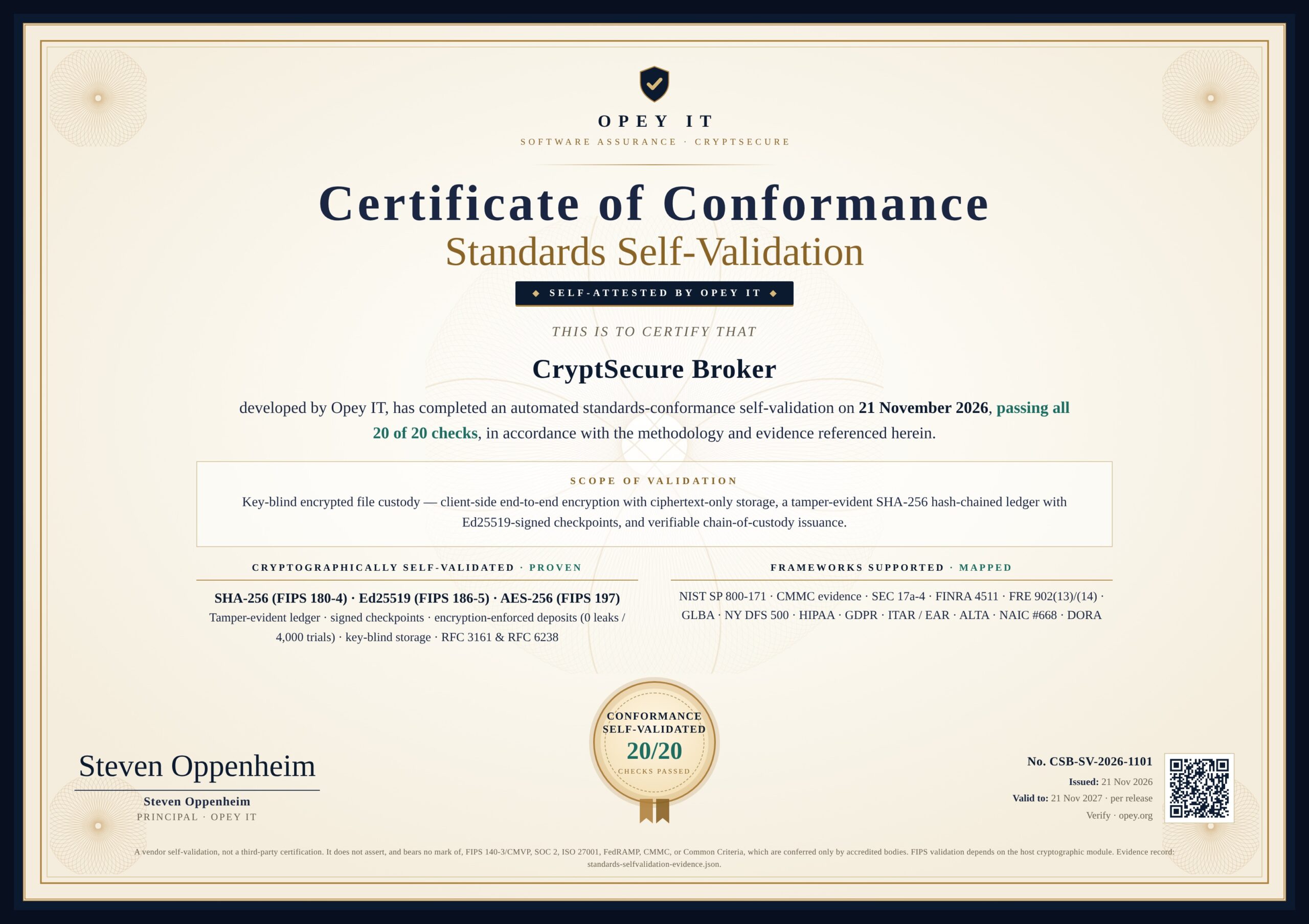
The Broker passed 20 of 20 standards conformance checks.
On 21 November 2026 the CryptSecure Broker completed an automated standards-conformance self-validation: SHA-256 (FIPS 180-4), Ed25519 (FIPS 186-5) and AES-256 (FIPS 197), the tamper-evident ledger and signed checkpoints, encryption-enforced deposits (0 leaks in 4,000 trials), key-blind storage, and RFC 3161 & RFC 6238.
Frameworks supported · mapped
- NIST SP 800-171
- CMMC evidence
- SEC 17a-4
- FINRA 4511
- FRE 902(13)/(14)
- GLBA
- NY DFS 500
- HIPAA
- GDPR
- ITAR / EAR
- ALTA
- NAIC #668
- DORA
Certificate No. CSB-SV-2026-1101 · valid to 21 Nov 2027, per release. Self-attested by Opey IT: a vendor self-validation, not a third-party certification.
Drag, Drop, Encrypt. Done.
Encrypting an entire project is as easy as dragging it onto the window. Files, folders and your message are bundled, signed and post-quantum encrypted into a single secure envelope — for one recipient or many.
One Envelope. Everything Inside.
Drop a file. Drop a folder. Drop a dozen of each. CryptSecure zips directories with their structure intact, attaches your message, signs it, and produces a single post-quantum encrypted envelope ready to deposit at a Broker or send through any channel.
- Drag-and-drop files and entire folders
- Directories auto-zip with full structure preserved
- Message + attachments → one signed, post-quantum envelope
- Recipient gets back the original files exactly as sent
- Multi-gigabyte jobs with real progress and a working Cancel
Drop files or folders here
or click Attach to browse
Experience the CryptSecure Workflow in Your Browser
Test the drag-and-drop mechanics and cryptographic processing firsthand, right now, before you install anything.
Harvested today, still safe tomorrow.
Attackers are storing encrypted data today to crack once quantum computers arrive. CryptSecure 3 is post-quantum by default and picks the strongest protection your recipient supports for you. Every option below is post-quantum and signed.
Hybrid (CNSA 2.0)
ML-KEM-1024 + ECDH P-384. The default: an attacker must break both.
DEFAULTX-Wing Hybrid
ML-KEM-768 + X25519, for broad interoperability with modern systems.
Pure ML-KEM-1024
Post-quantum only, for policies that require it. NIST FIPS 203.
Signed & Sealed
Every envelope carries an ML-DSA-87 signature and AES-256-GCM authentication.
NIST publishes its first post-quantum standards: ML-KEM (FIPS 203) and ML-DSA (FIPS 204), both used in CryptSecure v3.
Chrome, Edge and Firefox protect web traffic with hybrid classical + ML-KEM key exchange by default, the same layered idea CryptSecure uses by default.
NIST deprecates RSA and elliptic-curve public-key algorithms at all key sizes.
Those algorithms are disallowed under NIST standards. Data sealed with RSA alone is on borrowed time.
Timeline per NIST IR 8547 (final, Oct 2026) and FIPS 203.
Everything it takes to seal, guard and prove.
Post-quantum, signed, for one person or a whole group, on Windows and Linux, with a delivery channel that proves every handoff.
Seal
Desktop appDrag & Drop Everything
Drag any combination of files and folders onto either text area. One Attach button picks files or folders in a single dialog.
Folder Auto-Zip
Drop an entire directory and CryptSecure zips it automatically, preserving the full folder structure inside the encrypted envelope.
All-in-One Secure Envelope
Your message text, files, and folders wrapped into a single encrypted envelope. One file to send; the recipient unpacks everything back to original form.
One Envelope, Many People
Seal your message, files and folders once for a whole deal team, board or panel. Each person opens it with their own private key; anyone not on the list can’t, and no shared password ever changes hands.
Post-Quantum by Default
Hybrid ML-KEM-1024 + ECDH P-384 (the CNSA 2.0 set), with X-Wing (ML-KEM-768 + X25519) and pure ML-KEM-1024 available. NIST FIPS 203.
Signed Envelopes
Every envelope is signed with ML-DSA-87 (NIST FIPS 204). Recipients see who sent it and that nothing was altered, with safety numbers to confirm identity.
Protection Chosen For You
No cryptographer jargon and no mode chooser. CryptSecure derives the strongest protection your recipient and broker support, and shows you what it used.
AES-256-GCM
Authenticated encryption that detects any tampering: a changed or truncated envelope is refused rather than decrypted wrongly.
Argon2id Passphrase
OWASP-recommended Argon2id passphrase protection adds a second lock. Resistant to brute-force and GPU attacks.
Keys & Safety Numbers
Generate, import, export and back up your keys. Verify a contact once with a 32-character safety number; CryptSecure warns you if their key ever changes.
Windows & Linux, Offline
Runs on Windows 10/11 and Debian/Ubuntu (amd64 & arm64). Encrypting, decrypting and key management need no internet, no account and send no telemetry.
Backward Compatible
Opens every CryptSecure 2.x file and works with your existing v2.6 keys, and colleagues still on 2.6 can be in any group send: they automatically get their own 2.6-format copy. Microsoft Store users import their keys once (see the User Guide, section 2.2).
Harden
Built inClipboard Auto-Clear
Copied content is wiped from the clipboard 30 seconds after you copy it, so secrets don’t linger for other apps to read.
Esc = Instant Wipe
One keypress clears every in-memory message and attachment. Sensitive buffers are zeroed on a best-effort basis.
Passphrase Strength Meter
Live strength scoring with a breached-password blocklist and leetspeak detection, so “P@ssw0rd” doesn’t pass.
Hardware-Locked Keys
Private keys sealed by your PC’s TPM, a FIDO2 security key or your passphrase, shown as Strong, Medium or Basic. A copied key folder opens nothing. How it works
Recovery Code, Any Platform
One encrypted recovery package plus a recovery code only you hold. Restore on Windows, Linux or Raspberry Pi. No back door, so nobody else can.
Verified, Hash-Pinned Builds
Every release installs its components only from lock files checked against published SHA-256 hashes, so a poisoned package upload can’t slip into the build.
Work Where You Write
Outlook & Word add-inEncrypt in Outlook
Choose CryptSecure › Encrypt in a new email. Recipients come from To, Cc and Bcc; files up to 20 MB travel as one signed secure-message.csec.
Decrypt, Verify & Reply
Choose Decrypt on a received email to read it in the panel and see who signed it. Reply encrypted in one step, and keep a copy you can read later in Sent Items.
Encrypt Text in Word
Home › CryptSecure encrypts a selection or the whole document, and restores the readable text later. Text only: formatting, images and tables are not kept.
Send & Prove
CryptSecure BrokerKey-Blind, Multi-Broker
Connect to one or more brokers and switch in a click, with a live connection light. No private key or readable content ever reaches any broker.
Tamper-Evident Receipts
Hash-chained ledger with signed checkpoints, a separate verified pickup for every recipient, a lifecycle log both sides can read, and an exportable certificate.
Verified Keys & Recipients
Public-key directory, private address book with fingerprint verification, MFA-gated pickup, and invite-to-send for new contacts.
Verify Custody, Both Sides
Sender and recipient check a deposit’s tamper-evident trail from the app, before or after pickup. Every download is matched to the Broker’s custody fingerprint, and any certificate’s code can be checked in one click.
CUI & Classification Markings
Mark a send Public, Internal, Confidential, CUI or CUI//SP, with a distribution statement A to F. An unknown marking is refused before anything is encrypted.
Acknowledge, Then Release
Require each recipient to acknowledge before the file is released. One click picks up and acknowledges, and every person on a group send collects their own copy.
No home-made crypto. Only published standards.
Every algorithm CryptSecure uses is published and peer-reviewed by NIST, the IETF or the IRTF, the same building blocks governments and browsers rely on.
CryptSecure 3 Bundle Flow: From Drop to Signed Envelope
Everything bundled, signed and encrypted in one file: easy to send, easy to verify.
Legacy Flow (CryptSecure 2.6-compatible)
Used automatically only when your recipient is still on a CryptSecure 2.6 key.
Default Flow: Post-Quantum Hybrid (CNSA 2.0)
An attacker must defeat BOTH the quantum and the classical half — and can’t forge the signature.
Broker Delivery Flow: Proof Without Access
The Broker records every step but never holds a key that could open the envelope.
Your first secure send, in six steps.
Two ways to send, on Windows or Linux. Use a Broker when you need proof of delivery, or stay 100% offline and send the signed envelope any way you like.
Send with Proof
RECOMMENDED- 1
Create or Import Keys APP
Create a CryptSecure 3 key in Keys & contacts: post-quantum, and it signs everything you send. Your existing 2.x keys keep working.
- 2
Publish & Verify Public Keys BROKER
Register, publish your public key, and add contacts to your address book. Confirm each contact’s key fingerprint so you know you’re sealing to the right person. Not registered yet? Send them an invite.
- 3
Drop, Add Recipients, Seal APP
Drag files and folders onto the window, type your message, add one or more recipients, optionally add an Argon2id passphrase, and Encrypt. The protection is chosen for you and shown on screen.
- 4
Deposit the Envelope BROKER
Upload the sealed envelope. The Broker confirms it is genuine ciphertext, fingerprints it, logs it, and notifies your recipient. You can still recall it until it’s collected.
- 5
Verified Pickup & Local Decrypt BOTH
Each recipient passes identity and MFA checks on their own, downloads the envelope, and decrypts it on their own PC. They get back the original message, files and folder structures exactly as sent.
- 6
Keep the Receipt BOTH
Both sides can view and export the hash-chained record of deposit, notice, pickup and delivery, and generate a certificate when evidence is needed.
Send Any Way, Fully Offline
NO INTERNET NEEDED- 1
Create or Import Keys
Create a CryptSecure 3 key in Keys & contacts. It is post-quantum and signs what you send.
- 2
Exchange Public Keys
Share your public key with anyone you want to communicate with, over any channel, even insecure ones.
- 3
Add Your Recipients
Pick one person or many. CryptSecure derives the strongest post-quantum protection every recipient’s key supports.
- 4
Drop Your Files & Folders
Drag them onto the window. Folders auto-zip with structure preserved, and your message joins the same bundle.
- 5
Encrypt to a Secure Envelope
Add an optional Argon2id passphrase and click Encrypt to produce one envelope.
- 6
Send & Decrypt
Send via email, chat, USB or any method. Only the recipient’s private key can open it.
Need More Detail?
The CryptSecure 3.0.5 User Guide walks through every screen and command: first start, key protection and recovery, keys and safety numbers, Broker delivery and custody checks, scripting, and troubleshooting.
For work that has to stay private and stand up to scrutiny.
For anyone whose files must not leak, be altered or be disputed: encrypted offline, protected against quantum attacks, and delivered with proof.
Attorneys & Legal Teams
Send entire case folders in one encrypted envelope. Privileged communications and full discovery sets stay client-controlled and quantum-safe for decades.
+ Broker: a court-ready record of exactly what opposing counsel received, and when. See one →Investigators & Journalists
Bundle evidence folders, source notes, and photos into one secure envelope. Sources protected, future-proof encrypted.
+ Broker: fingerprinted, hash-chained custody from first handoff.Corporate Teams
Share entire project folders, contracts, financials and strategy docs, with one drag-and-drop. Protected against “harvest now, decrypt later” attacks.
+ Broker: embargoed release and recall for deal files and board packs.IT & Security Professionals
Test post-quantum workflows, package config bundles or log directories securely, and prepare your organization for the 2030 deadline.
+ Broker: enforced “encrypted-only” channel with CUI markings and an auditable trail.Healthcare & Finance
Encryption for patient-record folders and financial document sets that supports HIPAA and GLBA safeguards. Drag the whole folder, one envelope, fully protected.
+ Broker: tamper-evident delivery records for audits and examiners.Privacy-Conscious Users
Anyone tired of “free apps” that spy on you. True privacy, future-proof, drag-and-drop simple, without surveillance capitalism.
+ Broker: know your family’s will or tax file arrived, untouched.Others stop at encryption. CryptSecure proves delivery.
A privacy tool is only as strong as its architecture, and only as useful as the proof it leaves behind.
Swipe to see all columns →
| Feature | CryptSecure + Broker |
Other file-encryption tools e.g. GPG, 7-Zip |
Email / cloud drives Outlook, Dropbox, OneDrive |
Messengers Signal, WhatsApp |
|---|---|---|---|---|
| Protection | ||||
| Post-quantum encryption | ✓ | RareGPG 2.5+, command line | ✗ | Signal only |
| Hybrid classical + post-quantum, chosen for you | ✓ | Raremanual options | ✗ | Signal only |
| Private keys locked to your hardware | ✓TPM, security key or passphrase | Optionalsmartcards, classical keys | ✗provider holds keys | Device keystore |
| Recovery code that restores on Windows, Linux or Pi | ✓no back door | Manual export | N/A | Varies |
| User-owned, exportable keys | ✓ | ✓ | ✗ | ✗ |
| Encrypts 100% offline, no account | ✓desktop app | ✓ | ✗ | ✗ |
| Zero telemetry / tracking in the app | ✓ | Varies | ✗ | Varies |
| Workflow | ||||
| Drag-and-drop files & whole folders | ✓ | Varies | ✓but unencrypted | Limited |
| Message + files + folders in one envelope | ✓ | Varies | ✗ | ✗ |
| One envelope for many people, each with their own key | ✓post-quantum & signed | ✓mostly classical keys | Shared linknot per-person keys | Group chatsnot files you keep |
| Encrypt & sign inside Outlook and Word | ✓Windows add-in | Variesplugins such as GpgOL | S/MIMEclassical RSA/ECC certificates | N/A |
| Mac, iPhone & Android apps | ✗Windows & Linux today | ✓GPG Suite, OpenKeychain | ✓ | ✓ |
| Encrypt any file type | ✓ | ✓ | ✗ | Limited |
| Backward compatible with older versions | ✓ | Varies | N/A | N/A |
| Delivery & Proof | ||||
| Refuses unencrypted uploads | ✓ | N/A | ✗ | N/A |
| Provider can’t read your files | ✓key-blind | N/A | ✗unless you pre-encrypt | ✓ |
| Recipient verified before release | ✓ | ✗ | Link-based | Phone number |
| Separate verified pickup & receipt for each recipient of one envelope | ✓ | ✗ | Access logsprovider-held | Read receipts |
| Recall before it’s opened | ✓ | ✗ | Limited | Delete for everyone |
| Tamper-evident receipt both sides can verify | ✓ | ✗ | ✗provider logs only | ✗ |
| Court-oriented evidence certificate | ✓FRE 902(13)/(14) | ✗ | ✗ | ✗ |
Comparison reflects typical default behavior as of November 2026. Specific products and plans vary; check each vendor’s documentation. Trademarks belong to their owners.
Still available on the Microsoft Store
CryptSecure 3.0.5 is the current release. These earlier Windows versions remain free and fully functional on the Microsoft Store, and every file they create still opens in CryptSecure 3.
CryptSecure v2.6.0
The previous Windows release: hybrid RSA + ML-KEM encryption, drag-and-drop files and folders, folder auto-zip and the unified envelope.
CryptSecure v2.4.3
The prior stable release, kept for users with specific compatibility needs. Files encrypted with v2.4.3 decrypt automatically in newer versions.
Frequently Asked Questions
Sending with proof (Broker)
What is the CryptSecure Broker, and do I need it?
Can the Broker read my files?
What exactly does the “proof” prove?
Will it hold up in court?
What if I send to the wrong person or too early?
My recipient isn’t registered. Can I still send to them?
Has the Broker been validated against security standards?
Why not just encrypt a file and share it on Dropbox or OneDrive?
The CryptSecure 3 app
Can I send one envelope to a whole group?
How is that different from adding several recipients in PGP?
How are my private keys protected?
What if I lose my computer or forget how to unlock?
What’s new in CryptSecure 3?
Is there a user guide?
Is there a Linux version?
cryptsecure command. Grab it from the download section.Is there an Outlook or Word add-in?
What does the Outlook add-in encrypt, and what stays readable?
Does CryptSecure sign my messages?
Can I really drag an entire folder onto CryptSecure?
What goes into the “secure envelope”?
Which version should I download?
.deb. If you work in Outlook or Word on Windows, add the free Outlook & Word add-in on top of the Windows app. The earlier Windows releases v2.6.0 and v2.4.3 remain on the Microsoft Store for specific compatibility needs. Every version reads the others’ encrypted files, so you won’t lose access to your data.Will my old encrypted files and keys still work in CryptSecure 3?
Is there a size limit for folders or attachments?
Is CryptSecure really free?
Does it require an internet connection?
How do I share encrypted messages?
What file types can I encrypt?
What if I lose my private key?
Cryptography
What is post-quantum encryption and why do I need it?
Do I have to choose an encryption mode?
How does the post-quantum hybrid actually work?
What standards does CryptSecure follow?
Seal it. Send it. Prove it.
Post-quantum encryption, keys locked to your own hardware, and delivery you can prove. Start free in under a minute.
Windows & Linux · Outlook & Word · Post-quantum · Hardware-locked keys · Offline
All download options →Download the User Guide (PDF) →